Navigation: Basic Working Procedures > Schedule Board > Other Schedule Board Tools > Manage Layout Views >
Rename a Layout View


|
Navigation: Basic Working Procedures > Schedule Board > Other Schedule Board Tools > Manage Layout Views > Rename a Layout View |
|
To Rename a Layout View click on the Ellipsis button (…). of the Layout combo box below:

The Schedule Boards Layouts screen will appear.
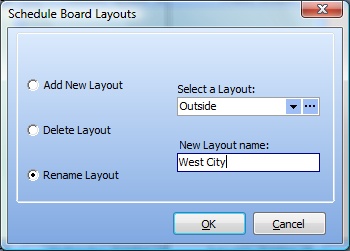
| • | Select the button for Rename Layout |
| • | Use the Select a Layout box to choose the Layout to rename |
| • | Fill in the New Layout Name box with a unique name |
| • | Click OK. |
Page url: http://www.fieldone.com/startech/help/index.html?_sched_board_other_tools_layout_views_rename_.htm