Navigation: Basic Working Procedures > Purchase Management > Purchase Orders >
Cancel Purchase Order


|
Navigation: Basic Working Procedures > Purchase Management > Purchase Orders > Cancel Purchase Order |
|
You can only Cancel a Purchase Order while the Status is still either Pending Approval or Pending Receipt. Once you have entered any Receipts you are no longer allowed to cancel.
To Cancel a Purchase Order:
| • | On the Tasks Panel at the left of the work screen, use the Lookup Manager |
| • | Select PO Lookup |
| • | The full-size Lookup screen will appear. (To add or change a record, see Large Lookup, Add or Edit.) |
| • | Double-click to open the desired Purchase Order |
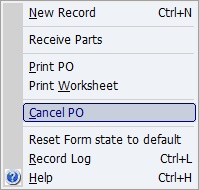
| • | Click on the Actions button |
| • | Select Cancel PO |
This will cause the Status of the Purchase Order to become Canceled.
Page url: http://www.fieldone.com/startech/help/index.html?_purchmanage_purchorders_cancel_.htm